Why has the formatting ribbon on the RichText editor been moved to the side of the editor?

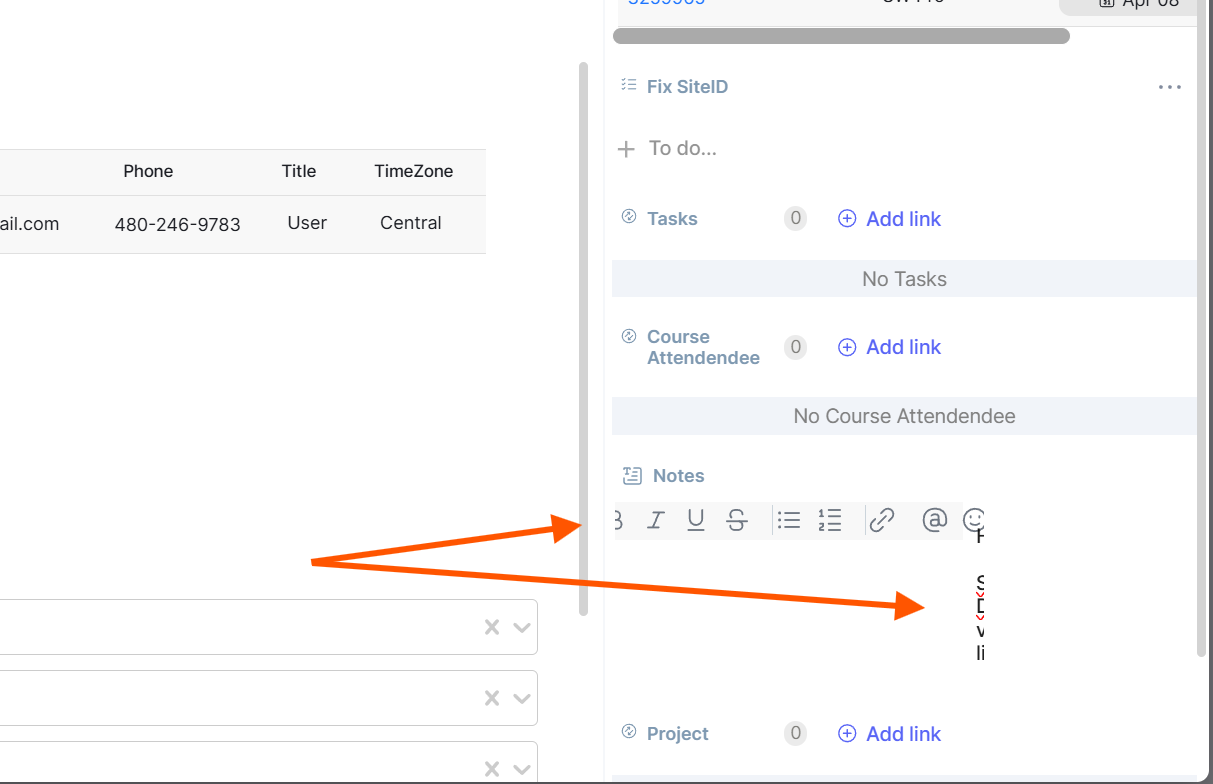
In my data cards, I have one or more RichText attributes. These allow for better note taking. As you can see in the image, the new behavior of the format ribbon is to have it on the left side of the field, when editing. In this particular case, it consumes the window and the field is now unusable.

A secondary issue is that I cannot adjust the size of the primary and secondary columns so this field will need to be moved. I don’t want to do this, but will have to until something is done for the RichText editor.
1 Like

Hello @EarlHasz ,

The bug was detected by our teams yesterday and addressed immediately. We’ll keep you updated on its resolution right here.

Tracking number #235050 :ant:
Thanks again for your feedback and reports!

1 Like

Hello @EarlHasz

Thank you again for your feedback on this behavior.

We have delivered a fix for the display of the Long Text field in the item editing panel.

The field should now remain correctly positioned and usable, even when editing long content.

Please let us know if you still notice any issues on your end.

Have a good day,

1 Like